

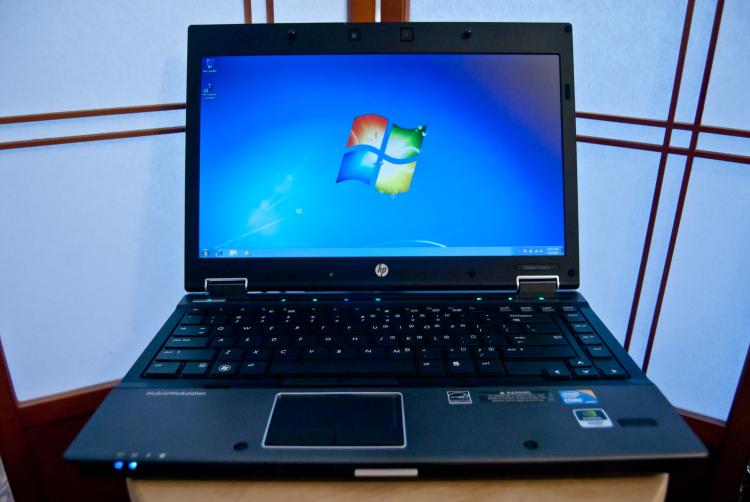
The HP EliteBook 8440w Mobile Workstation is a sleek-looking laptop with enough power to meet the needs of most professional users.
In order to win the title of “workstation,” the computer had to match hardware and software standards required for powerful technical or scientific applications. The HP EliteBook 8440w is also the company’s thinnest, lightest, and first 14-inch mobile workstation.
It should be added that although this is HP’s slimmest and lightest mobile workstation, it is not that thin or light compared to other available notebooks. But considering the power behind this machine, it does pretty well in both categories.
The performance ratings for the HP EliteBook 8440w are among the highest of notebooks in its class, and it stands high among competitors. It’s a versatile machine geared for businesses, engineers, developers, graphic designers, and users who need a bit more power from their notebooks.
The 8440w also meets military-grade durability standards, comes packed with some of HP’s coolest technology, and enough security features to ensure sensitive data storing while traveling.
The price is a bit steep, but as in most cases, you get what you pay for.
Going Elite
The HP EliteBook 8440w is a tough-looking computer. It has a scratch-resistant aluminum outer shell and a magnesium alloy inner shell. It can take 300 pounds of crushing power.
Adding to that, this notebook meets military-grade durability standards for vibration, dust, humidity, altitude, and high temperatures. You can heat this computer up to 140 degrees Fahrenheit, or drop the temperature 20 below zero and it will still keep ticking.
It also has a spill-resistant keyboard with a drain on the side, allowing it to endure minor spills.
With Computrace LoJack Pro, if the notebook is lost or stolen, a user can remotely delete specific files or wipe the full computer clean. It can also locate the computer—given that the thief logs onto the Internet.
To add some extra security, the HP EliteBook 8440w has drive encryption and a fingerprint scanner.
There are some pretty cool features included with this notebook, in addition to its security tools.
The HP EliteBook 8440w is one of the first HP notebooks to come equipped with HP SkyRoom, which is a videoconferencing application that uses HD video and hi-fidelity audio. It can be used for high performance, 3-D application sharing.
If you need to access e-mail or contact information from Outlook, but don’t have time to boot up the computer, one-key access to HP QuickLook 3 can be used to access this data in seconds.
This handy feature uses a light Linux operating system which boots almost immediately. Since it’s in a separate operating system, it keeps your main work area safe, and it can also use the same password and fingerprint scan from the main operating system.
QuickLook 3 syncs data from Outlook on the main operating system, so it can be used to access e-mail, tasks, contact information, and your calendar. Once the computer is booted up, it will then sync any changes that were made and send out any e-mails that were composed.
QuickWeb works in a similar fashion, only it lets you access the Internet. After pressing the quick launch key, the user can browse the Web within 20 seconds, without needing to boot up the entire system. Since it runs in a separate Linux operating system, any issues here are unlikely to affect the main operating system.
Using the 8440w
The HP EliteBook 8440w has a nice feel to it, overall. The keys on the keyboard have just enough depression with each click to be comfortable while typing, and there are plenty of shortcut keys including for volume control.
For working at night, HP chose to use an LED light attached to the top of the screen, rather than a backlit keyboard. I have to say that I like it more than the backlit keyboard, as it feels more natural and works well.
The 8440w touchpad is able to use finger gestures also, which is a great addition. Similar to a Mac or an iPhone, this enables users to use finger gestures to zoom, scroll, and so on.
In addition to the trackpad, there is also a pointing stick on the keyboard, which quickly grew on me. The joystick-like button is easy to use and works quite well when the task doesn’t demand dead-on precision. It also has its own right click and left click buttons.
One thing I wasn’t too pleased with, however, was the way the buttons on the trackpad depress. They’re placed on a hinge, which means that if you hit the top, they don’t always click. Keep in mind that it didn’t seem to get in the way too much though, and most users could probably get used to this after a few weeks of use.
Last, but not least, the HP EliteBook 8440w includes HP Power Assistant. This measures and logs a user’s energy use and can display the data with an estimated carbon footprint, as well as the cost for the energy consumed. It can also give guidance on how to reduce energy use, and presents the data in a visual format that’s easy to comprehend.
The real use of this is mostly for companies trying to track energy use and of course users who care about their own impact on the environment.
In a Nutshell
The HP EliteBook 8440w is a great notebook with enough power to meet the needs of most users in the business world. The price is right for notebooks in its class, and SkyRoom, QuickLook 3, and QuickWeb are great tools to have on hand.
Although your data is never completely safe in today’s world, regardless of the computer, the ability to remotely delete data adds quite a bit of assurance to users who need to store sensitive information. If you misplace it or even if get it stolen, it’s comforting to know there’s a chance LoJack could get it back.
Also, the durable design of the 8440w allows it to travel just about anywhere without much worry that it will get damaged.
[etRating value=“ 4.5”]
price: $1,399 - $1,649
website: www.hp.com